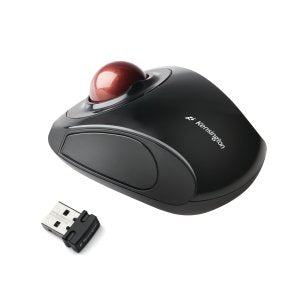
<b>2.4GHz Wireless Nano Receiver</b>\n\nOffering cable-free versatility for productivity on the go, the receiver can be stored inside the trackball for safekeeping when not in use\n\n<b>Touch Scrolling</b>\n\nThis unique feature lets you slide your finger around the outer ring of the trackball, letting you glide effortlessly through web pages and long documents\n\n<b>Optical Tracking Technology</b>\n\nProvides precise cursor movement for superior accuracy so you can get where you want on the screen quickly with less hand movement, improving productivity and efficiency\n\n<b>Ambidextrous, Two-Button Design</b>\n\nAlong with a centered compact 32mm ball, it works equally well for either right-handed or left-handed users\n\n<b>TrackballWorks™ Customisation</b>\n\nFree downloadable software provides an even more personalized experience, giving you the ability to assign a wide variety of program functions to each of the 2 buttons, as well as adjusting cursor and scrolling speeds\n\n<b>Plug & Play Installation</b>\n\nQuickly get clicking and scrolling with fast, simple installation through the wireless USB receiver with the driver downloading automatically
Key Features
Unique touch scrolling lets you glide effortlessly through web pages and documents|Two customizable buttons with Kensington TrackballWorks™ software|Secure 2.4Ghz wireless technology reduces risk of interference and is ideal for office environments|Ambidextrous design for left or right-handed users|USB Plug & Play|A distinctive centered-ball design gives you more comfort and precision|Nano Wireless USB reciever stores inside mouse battery compartment when travelling|Requires 2 x AA batteries (included)|On/Off switch helps prevent accidental battery drain|Professional matt black high gloss black finish
Product Details
Brand: Kensington
Model: Orbit
Category: Mice
SKU: 1724029
Authorised reseller buy with confidence
Estimate delivery times: 3-5 days (Australia Wide).
Thank you for registering! We will notify you by email when it is back in stock.
PayPal Pay Later Messaging
Step 1: Choose message placement
Click the button below and then hover over your page to select a placement.
Step 2: Paste and save
You have copied the placement for the Product Page.
Go back to the App Embeds section, and in the Paypal Advanced Settings, paste the copied value into the
Product Page field and click the 'Save' button in the top right corner.